Collect · Verify · Understand

Engineered for Product intelligence, Market research, Campaign & customer feedback, Customer experience & service improvement, Multimodal survey intelligence.

Validate real buyer demand, willingness-to-pay, and feature priorities before committing code or capital.

  • Product authentication with unique QR codes
  • Offline field collection with GPS verification
  • Rich media: photos, audio, documents & text
  • Speeder, duplicate & fraud detection
  • Direct citations back to verified survey responses
Enterprise Foundation

Built on open standards, verified data privacy, and full revision history.

Portable XLSForm schemas with zero vendor lock-in, no AI model training on customer data, and revision histories across all projects.

STANDARDS
XLSForm

Native ODK & XForms compatibility with visual drag-and-drop logic branching

Import questionnaires or build forms visually. Full bidirectional support for open spreadsheet schemas, visual skip-logic trees, and ODK/XForms compatibility so your questionnaires stay 100% portable with zero vendor lock-in.

XLSForm & XFormsVisual Logic TreesZero Vendor Lock-in

ACCESSIBILITY
English

interface across the public site and workspace

A unified, predictable English interface across the public site and workspace. Engineered to WCAG AA accessibility standards with full keyboard navigation, screen-reader semantics, and high-contrast typography for effortless operational clarity.

Unified English UIWCAG AA ContrastKeyboard & Screen Reader
DATA PRIVACY
0

Customer records used to train external or platform AI models

Your surveys and submissions belong entirely to you. We never sell your data or use customer submissions to train machine learning models. Analysis summaries link directly to the underlying survey responses so you can verify every conclusion.

0 Records TrainedTenant IsolationVerifiable Citations
GOVERNANCE
Versioned

Published forms and submission corrections keep revision history

Every published form version is preserved. All schema changes are tracked over time, reviewer edits maintain an audit history, and automated quality checks flag suspicious responses for human verification.

Full Revision TrailVersioned SchemasQuality & Fraud Checks
Works withOpen ecosystem integrations across your data stack
XLSFormXFormsUnique Product QRExcel (.xlsx)CSVREST APIWebhooksYour SMTP
Who answers

Enumerators, applicants, customers, citizens

The same platform reaches a household in a village with no signal and a customer filling in a form on a phone in a city centre.

An enumerator interviewing a family beside a rice field on a tablet
Household interview, offline on a tablet
A health researcher interviewing a woman outside her home
Door-to-door health surveillance
A researcher speaking with a shopper in a retail street
Street intercept, syncing live
A researcher and community leader outside a solar centre
Community research
Use cases

One platform for every form you run

A form can be a survey, an application, a sign-up or a checklist. Each one can have its own access rules, review steps, notifications and reports.

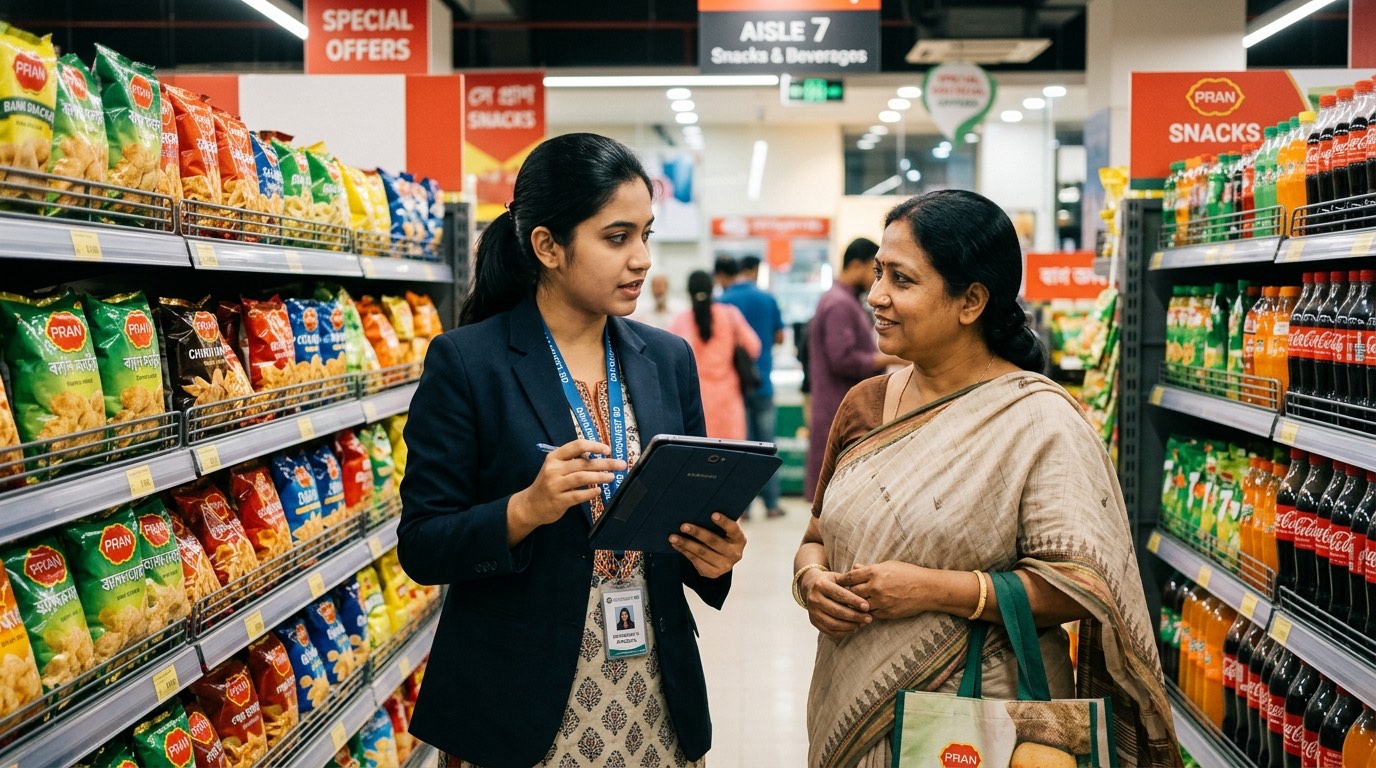
A market researcher conducting a consumer product demand survey in a supermarket on a tablet in Bangladesh

Market research & intelligence

Measure new product demand, evaluate consumer sentiment for products and services, and guide intelligent strategy analysis.

Product demand testing · market intelligence · consumer sentiment · price sensitivity · strategic analysis

Explore

Feedback & satisfaction

Collect feedback from the people you need to hear from, review privacy settings and compare compatible rounds over time.

Staff, customer, student, patient, member or citizen feedback · pulse and exit surveys · service ratings

Explore

Applications & reviews

Collect applications with documents and move each through your own review stages.

Jobs · grants · admissions · awards · supplier onboarding · permits

Explore

Registrations & sign-ups

Capacity limits, waitlists and approvals, with participants kept informed.

Events · trainings · enrolment · memberships · volunteers

Explore

Requests & checklists

Structured forms for the work your teams do every day.

Service requests · incident reports · inspections · audits · approvals

Explore
A community healthcare worker conducting a mass medical survey on a digital tablet in rural Bangladesh

Field data collection

Prepare published forms on registered devices before working with little or no connectivity. Save browser drafts offline, then synchronize and review conflicts when a connection returns. Draft encryption depends on browser support.

Mass surveyOffline formsGPS checksPhotos & audioDevice management
Explore

Designed for: government and public-sector bodies · NGOs and development programmes · research agencies and universities · businesses · associations and membership organisations

How it works

From a brief to a finished report, in one place

  1. 01

    Describe it

    Tell Jorip what you need to learn, who you are asking, the language and how many questions you want.

  2. 02

    Draft it with AI

    When enabled, AI returns an editable question draft for you to review. You can also author every question manually.

  3. 03

    Refine it

    Edit, reorder, add your own questions, set answer types and logic, or import an XLSForm.

  4. 04

    Publish it

    Validation runs before anything goes live. Every published version is locked and kept.

  5. 05

    Collect it

    Share by link, QR, email, WhatsApp or embed, or send teams into the field offline.

  6. 06

    Check it

    Quality signals flag rushed, duplicated or implausible submissions for a person to review.

  7. 07

    Understand it

    Ask questions in plain language, build dashboards and analyse open-text answers.

  8. 08

    Act on it

    Generate project PDFs on request, share supported exports and configure webhooks. Review workflow decisions keep an audit history.

Form Studio

Describe it, draft it, shape it

Start from a prompt, a visual canvas, or the spreadsheet you already have. Every route produces the same validated, version-controlled questionnaire ready for online or offline deployment.

  • AI-Powered Drafts: Describe your survey objectives in plain language to generate full question sets, choices, and skip logic in seconds.
  • Visual Drag-and-Drop Canvas: Build with 20+ question types, matrix blocks, cascading choices, and repeat groups with instant preview.
  • XLSForm Standard & Versioning: Full compatibility with standard XLSForm spreadsheets, automated validation checks, and one-click rollback.
jorip / studio / visual-builderVisual Builder
Question typesTextChoiceRatingGPS pointPhotoSignatureMatrixSection 1 · householdHousehold head nameMain water sourcePipedWellRiverDrop hereGPS pointPROPERTIESRequiredAccuracyunder 15 mShow ifconsent = yesLabel (বাংলা)অবস্থান
Supports 20+ field types, skip logic, constraints & multi-language forms.Read builder guide
Collection

Collect online, offline or through any channel

Bring submissions from supported channels into the same workspace. Distribution links use the published form version configured for that link.

  • Public and member links with expiry dates, revocation, access limits and short links.
  • Source tracking. Channel, campaign and UTM values are saved with each public submission.
  • Offline collection. Registered devices, downloadable forms, duplicate-safe sync and remote device removal.
  • For respondents. A progress bar, a confirmation with a reference number, and your logo and colour.
ODK Collect & OpenRosa compatible
EmailWhatsAppQR codeOfflineWeb embedLinkedIn
Data Quality

Find quality signals before you rely on the data

Automated integrity rules continuously inspect incoming responses for anomalies, duration violations, GPS outliers, and duplicate patterns before data enters your analysis.

  • Speed & Latency Detection: Identifies interviews completed suspiciously faster than humanly readable (e.g. 43s vs 14m median).
  • GPS & Geofencing Bounds: Verifies field enumerators are physically within the assigned survey polygon with precision tolerances.
  • Duplicate & Pattern Analysis: Flags matching answer fingerprints, straight-lining across scale questions, and spoofed submissions.
  • Multimodal AI Audits: Automatic image verification flags stock photos, duplicate uploads, and blurred field documentation.
Sample checkRULE: SPEED_01 · DURATION_THRESHOLD
Interview duration · this formmedian 14:20threshold 6:002 submissionsfaster than 2.4× the median
SUB-8842Duration 43s is faster than 2.4× the median (14:20). Flagged for human review.Triage Guide →
Workflows

What happens after someone presses send

Choose a preset to watch a submission travel through it, or build your own stages, approvals and messages.

Illustrative workflow examples use sample records. Registration notifications depend on configured recipients and delivery; a review-stage change alone does not send every example message.

  1. Submitted

    A place is held and a reference is issued.

  2. Checked

    Contact details are checked for duplicate registrations.

  3. Capacity

    Inside the limit, or moved to the waitlist.

  4. Approved

    A person confirms, or approval is automatic.

  5. Confirmed

    The participant is told, and attendance is tracked.

Registrationsto the participant

You are confirmed for the training

Your place is held. Reference REG-2841. The organiser will share the venue and time.

Example message · check configured delivery

Capacity

184 of 200 places taken16 left

Everyone beyond 200 is placed on the waitlist automatically, in order.

Decision history

  • Registration received09:41
  • Duplicate contact checked09:41
  • Place confirmed by Amina10:02
Append-only. Entries cannot be edited or removed.
Analysis & Reporting

From a question to a signed-off report

Explore results with reviewable queries and dashboards, save report definitions, and generate signed-off project PDFs on request. Every visual metric links directly to source rows.

  • Natural Language Text-to-SQL: Query survey datasets in plain English. Check transparent, read-only SQL queries before running against source rows.
  • Interactive Dashboards: Slice and dice submissions by demographic cohorts, locations, or time periods with instant statistical charts.
  • Signed-Off PDF Reports & Exports: Produce publication-grade briefs with methodology notes, confidence intervals, or export directly to CSV and SPSS.
jorip / insights / executive-dashboardLive Dashboard
Submissions today1,284COMPLETION87%Flagged for review23Active collectors46Accepted submissions · last 14 daysQuality mixAccepted 82%In review 13%By district
Integrates with PostgreSQL, R / SPSS, CSV / Parquet, and automated webhooks.Read analysis guide
Security

Security and privacy controls

Jorip holds personal information about the people you serve. These are the controls that protect it.

  1. 01

    Isolated workspaces

    A workspace subdomain for each organisation, with server-side tenant checks and automated isolation tests.

  2. 02

    Custom roles

    Workspace and project roles from a permission list, checked on the server every time.

  3. 03

    Full audit history

    Published forms are locked, corrections create revisions, and administrative actions have audit records.

  4. 04

    Privacy tools

    Consent records, access and deletion requests, retention rules and legal holds.

  5. 05

    AI controls

    Workspace controls for provider-backed AI, workflow-specific data safeguards, and reviewable outputs.

  6. 06

    Support access by approval

    Time-limited grants approved by your owner, with every action recorded.

We do not currently hold ISO 27001 or SOC 2 certification, and will say so here until we do.

FAQ

Common questions

No. Organizations use Jorip for field surveys, census projects, product QR verification, customer feedback, store inspections, applications, and registrations. You can also add review stages, approvals, and automated notifications to any form.